21 AI ad software workflow checks for small teams
The AI ad software that actually works for small teams is the one that locks Brand DNA and supports scene-level regeneration, so you can run controlled one-variable batches and get a clean 48 to 72 hour readout.
We built Advertisable AI for the operator constraint behind all of this: you need speed, but you need control more. Our workflow starts from a product link, extracts Brand DNA as guardrails, keeps your beats visible in the Storyboard Editor, and uses Scene Regenerator for scene-level fixes instead of full rerenders.
Start your evaluation where the workflow either holds or collapses: can the tool generate a first draft from a product URL that is accurate enough to approve, iterate, and test without rebuilding from scratch.
1. It generates a first draft from a product URL
This is the fastest value check for AI ad software: can you paste a product URL and get a usable first draft without babysitting inputs. The URL should pull product facts and on-page brand cues, so your script and storyboard start grounded in what you actually sell. That matters because most 90-day tool abandonments we see come from rework caused by missing basics like specs, claims, or positioning.
Acceptance criterion: time-to-first draft is under 10 minutes.
2. It extracts Brand DNA instead of relying on prompts
Prompt-only generation is where brand drift starts: your variants inherit the model’s defaults, not your identity. Brand DNA extraction flips that by capturing the hard constraints up front, so every output stays inside your design and voice system. That means your fonts, colors, and tone are pulled from the source of truth and held constant while you test.
The second filter is accuracy. You need checks that validate product claims and specs against what’s on the page, and flag missing disclaimers before approvals. With guardrails locked, you stop scaling off-brand variants that die in review.
3. You can lock Brand DNA before generating variants
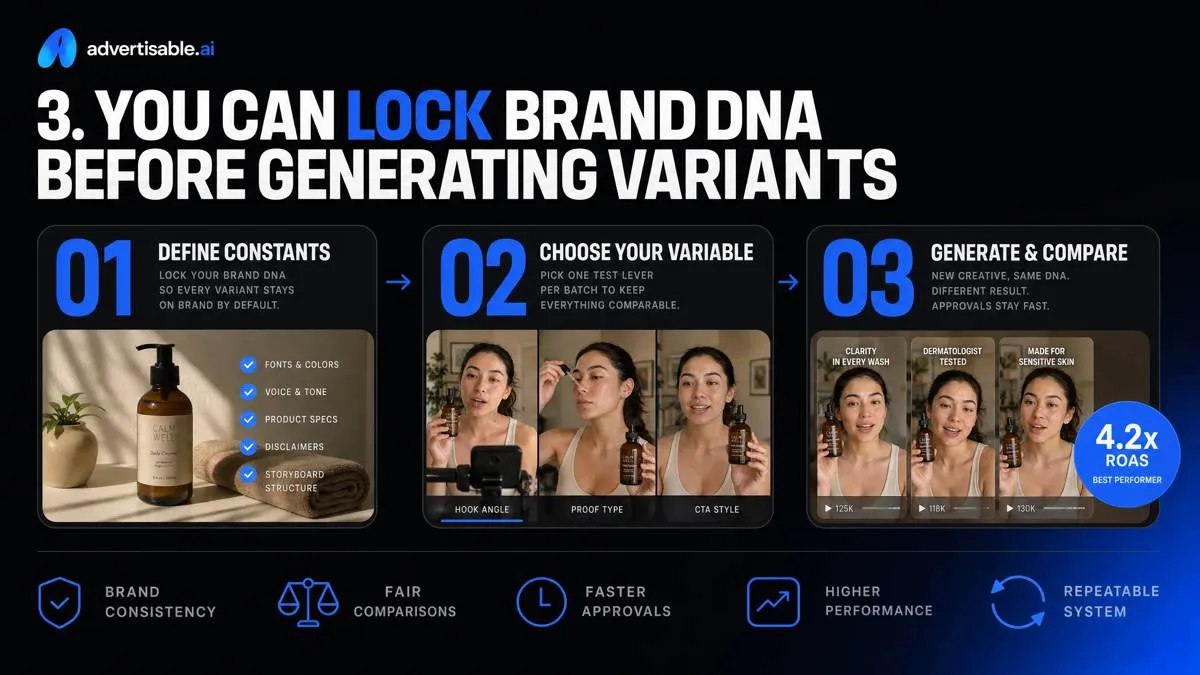
Brand drift is optional if you lock Brand DNA once and reuse it across every batch. The goal is comparability: each variant should be the same ad, except for the one element you are testing, so approvals do not restart from zero every week.
Define constants versus variables up front. Constants are the non-negotiables: fonts, colors, voice rules, product specs, disclaimers, and the approved storyboard structure. Variables are the single test lever for this batch, like the hook angle or proof line.
Keep the approval checklist stable and binary: Brand DNA match, claims accuracy, required disclaimers present, packaging and pricing correct, and only the intended variable changed.
4. It works storyboard-first, not render-first
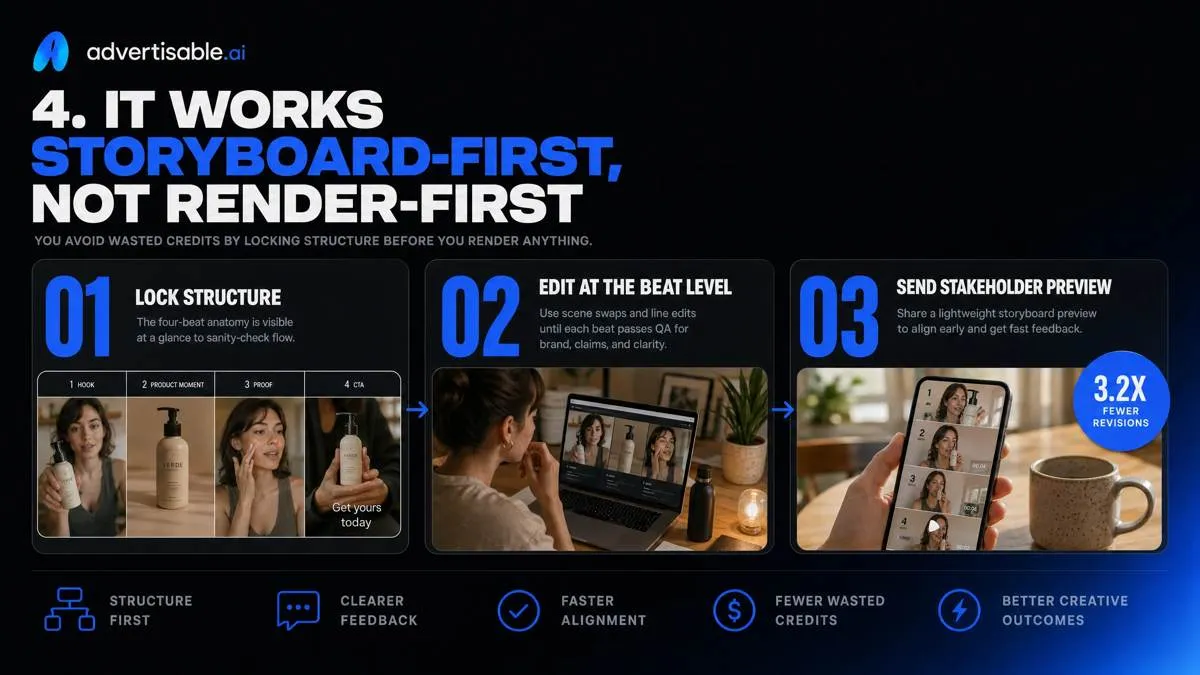
You avoid wasted credits by locking structure before you render anything. The four-beat anatomy should be visible on one screen so you can sanity-check flow: hook, product moment, proof, CTA. Edit the script at the beat level first, using scene swaps and line edits until each beat passes QA for brand, claims, and clarity.
Then send a lightweight stakeholder preview from the storyboard (not a final export) and only render once you have explicit approve or revise notes.
5. You can keep one variable per batch
A batch is only attributable when you change one variable and hold everything else constant. “One variable” means a single creative element like the hook angle or the proof line, not a bundle of edits. Keep batches small: 3 to 5 variants is enough to see directional lift without spreading spend too thin. The hard rule is no mixed changes, because contamination kills learning: if hook, CTA, and product moment all shift, you cannot explain the winner or reproduce it.
6. It regenerates one scene without remaking the whole ad
The fastest way to burn time and abandon a tool within 90 days is being forced into full rerenders for a weak hook, muddled proof, or a soft CTA. You need scene-level swaps, not “start over.” In a storyboard-first workflow, you regenerate hook-only variants while holding the rest constant, then wait 48 to 72 hours for a clean readout. If CTR is fine but CVR lags, swap just the proof beat (testimonial line, demo moment, offer clarity) without touching pacing.
Then refine only the CTA scene: tighten the ask, on-screen text, and end-card timing, and pass QA for claims and disclaimers before exporting.
7. Scene edits preserve everything you held constant
Scene-level edits only help you learn if everything you meant to hold constant stays truly constant. Lock your unchanged brand elements as acceptance criteria: Brand DNA outputs (fonts, colors, logo placement), voice and tone, product facts, and required disclaimers should not move just because you regenerated one beat.
Hold runtime targets steady, too. A hook swap that quietly stretches a 15s ad into 19s changes pacing and delivery, not just the hook.
Finally, prevent silent script drift. Regeneration should update only the selected scene text, while the surrounding copy remains byte-for-byte identical so your test is clean.
8. It exports platform-ready 9:16, 1:1, and 16:9
Shipping tests this week usually breaks at the last mile: you have a good cut, but it is the wrong shape for the placement. Your workflow should export 9:16, 1:1, and 16:9 from the same approved storyboard so the hook, proof, and CTA stay identical across formats, instead of creating three separate projects. That matters because major platforms standardize around these three core ratios, as shown in social media video specifications.
Safe zones have to hold across all three exports, especially for captions, product shots, and CTAs. We treat it as a QA check: no critical text or logos near edges that will get cropped by UI overlays. When the tool respects safe zones and exports each ratio directly, you remove the manual resizing step that slows iteration and introduces drift.
9. It supports production-ready 1080p output
Previews lie. You need true 1080p deliverables (1920x1080) because that is the baseline behind YouTube's 1080p standard and most paid placements. Our acceptance check is simple: export at 1080p, then review the final file, not the timeline.
Before you ship, do two QA passes: (1) text legibility at 100% scale on a phone, with small legal and supers held for at least a beat, and (2) a compression artifacts review on gradients, fast motion, and fine patterns where blocking and banding show up first.
10. It gives you commercial rights without extra steps
The fastest way to waste 90 days is shipping a winner, then pausing because nobody can confirm you are allowed to run it in paid ads. You want commercial usage terms that are explicit: created assets are cleared for business use the day you export, not after a separate license request or a back-and-forth with support.
Provenance matters just as much. Your tool should keep a traceable trail from product URL inputs and Brand DNA to the final render so you can answer, in one review, what source facts and assets were used.
That clarity makes approvals easier. When marketing, brand, and legal see “full commercial rights” and a verifiable asset trail, sign-off becomes a QA check, not a negotiation.
11. It supports AI-generated content disclosure requirements
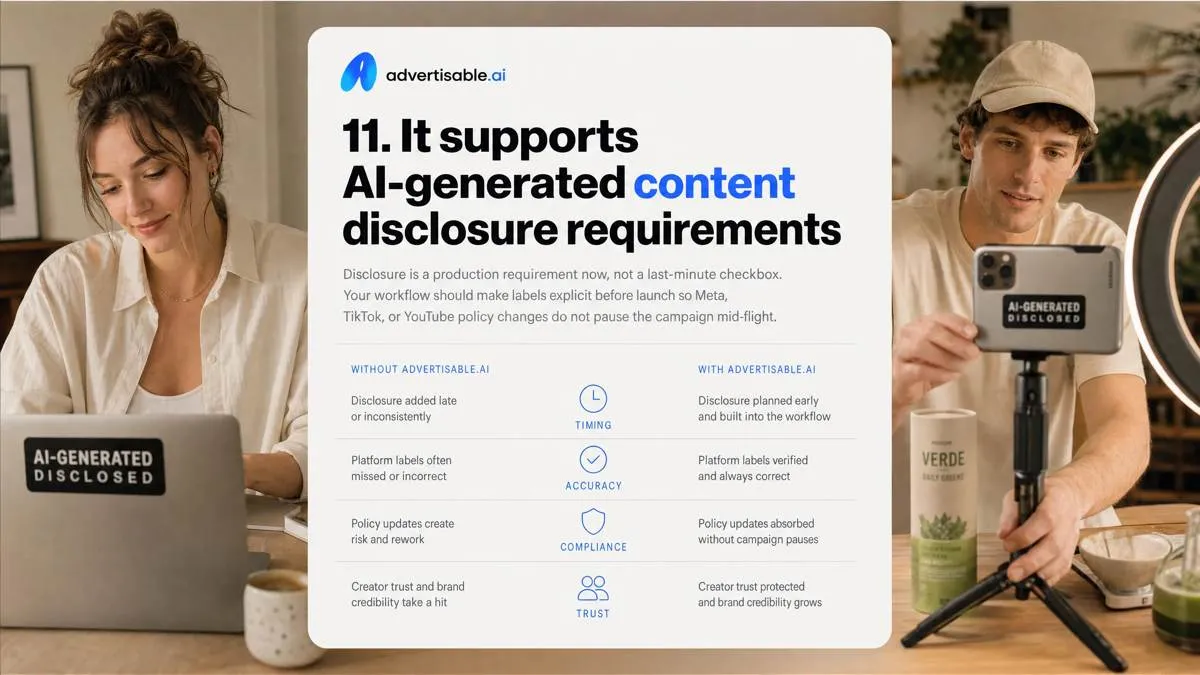
Disclosure is a production requirement now, not a last-minute checkbox. Your workflow should make labels explicit before launch so Meta, TikTok, or YouTube policy changes do not pause the campaign mid-flight.
On Meta, plan an “AI Info” label path: tag assets that are AI-generated or significantly AI-edited and QA that the label shows correctly in the ad’s About panel. On TikTok, treat synthetic media as two steps: the visible “AI-generated” label plus the separate ad-level “AI Disclosure” tag for realistic AI content. On YouTube, build a manual altered-content flag into your publish checklist, because repeated failure to disclose can trigger penalties under platform disclosure requirements.
12. It prevents claim creep across variants
Claim creep is what breaks compliance at scale: one variant quietly changes a spec, another implies a new outcome, and now you are running multiple ads that are not describing the same product. You want variation in angle, not variation in facts.
In practice, your guardrails should keep specs consistent across every export: same model name, included components, sizes, and any packaging or warranty details pulled from the product URL. The tool should also block net-new health claims, not “improve” copy by inventing benefits you never approved.
Finally, proof cannot float. Testimonials, studies, awards, and reviews need to stay attached to the exact source reference that authorized them, so any regenerated scene carries the same proof payload forward, not an unsupported rewrite.
13. It makes approvals faster, not noisier
Speed is not your constraint. Review cycles are. The tools you abandon in 90 days usually fail here: stakeholders cannot see what changed, feedback fragments across threads, and QA rechecks the whole asset every round.
You want shareable review links with in-context comments, so brand and legal can pin notes to the exact moment. You also need clear version naming (V03-HookA-ProofB), so nobody approves the wrong cut. Finally, require per-scene diffs, so QA only retests the edited beat, not the full video.
14. It keeps a clean audit trail of what changed
Clean tests require clean records. For every variant, you should label the single variable you changed in plain language (for example, Hook-Angle-Fear vs Hook-Angle-Aspiration) so results map to one decision.
Keep scene history preserved, not overwritten: the control storyboard stays locked, and each edit creates a traceable version of the specific scene you touched. That is how you avoid “we think it was the hook” debates.
Use export naming conventions that carry the variable, scene ID, and date, like Brand_Campaign_S1Hook_HA02_20261113_v03, so files sort correctly across reviewers and channels.
15. It supports a 48-72 hour readout cadence
You can get attributable learnings fast enough to matter, as long as you keep the batch clean and the targets explicit. We set one primary success metric per batch with acceptance criteria: thumb stop strong enough to earn attention, CTR to prove the message, and CVR to prove the offer. Run a minimum of 3 to 5 variants with only one scene changed, then hold spend and audience constant and read the result in a fixed 48 to 72 hour window.
That window is long enough for signal to stabilize, but short enough to avoid platform and market drift.
16. It avoids credit burn from full rerenders
Credit-based tools get expensive when a small fix forces a full rerender. If the hook is wrong or one claim needs tightening, you should only pay to regenerate that scene, not the entire timeline. That keeps iteration loops short: lock the storyboard and Brand DNA, change one beat, then read performance in 48 to 72 hours.
With 25 credits per month on Advertisable AI Studio Pro 25, scene-only fixes protect capacity, so your weekly throughput stays predictable instead of getting consumed by rework.
17. It integrates with your chat workflow when needed
You do not need to abandon chat to keep speed. With MCP integration, you can use Claude for drafting hooks, proof lines, and variant concepts, then hand them into the studio with the same structured inputs. The same applies to MCP integration with ChatGPT when you want fast prompt iteration or stakeholder review in-thread.
The acceptance criterion is simple: prompts can be free-form, but outputs must stay inside Brand DNA guardrails so voice, product facts, and claims do not drift when you move between chat and production.
18. It supports multi-format outputs from one storyboard
You should not run three separate projects just to get 9:16, 1:1, and 16:9. Lock one controlled storyboard, then export three aspect ratios so every placement inherits the same beats and approvals. Acceptance criteria: your hook lands at the same second across all exports, so your 48 to 72 hour readout stays attributable.
QA the “safe zones” before export: keep on-screen text and key UI away from edges so nothing gets cropped by platform overlays.
19. It fits how small teams staff creative
This only works for small teams if one operator can run the whole loop without dragging in a video editor. You generate from a product URL, lock Brand DNA, and work in a Storyboard Editor so edits stay scene-level, not timeline surgery.
Approvals stay lightweight: your approver checks a single storyboard pass for brand, claims, and structure, then you ship 3 to 5 one-variable variants and wait 48 to 72 hours before requesting more changes.
Acceptance criteria are simple: on-brand visuals and voice, no claim errors, and exports ready to launch without specialist editing.
20. It replaces rework with scene-level iteration in Advertisable AI Studio Pro 25
Your adoption risk is predictable: scaling variants causes brand drift, and fixing one weak beat forces a full rebuild. Advertisable AI Studio Pro 25 addresses both by extracting Brand DNA from your product URL (fonts, colors, product specs, voice, positioning) and letting you lock those guardrails before you scale.
You keep control in the Storyboard Editor, where each scene is its own decision point. After your 48-72 hour readout, you use Scene Regenerator to replace only the losing scene (hook, product moment, proof, or CTA) while holding everything else constant, then export 1080p in 9:16, 1:1, and 16:9 for clean batch tests.
21. How do you test an AI ad tool in 30 minutes?
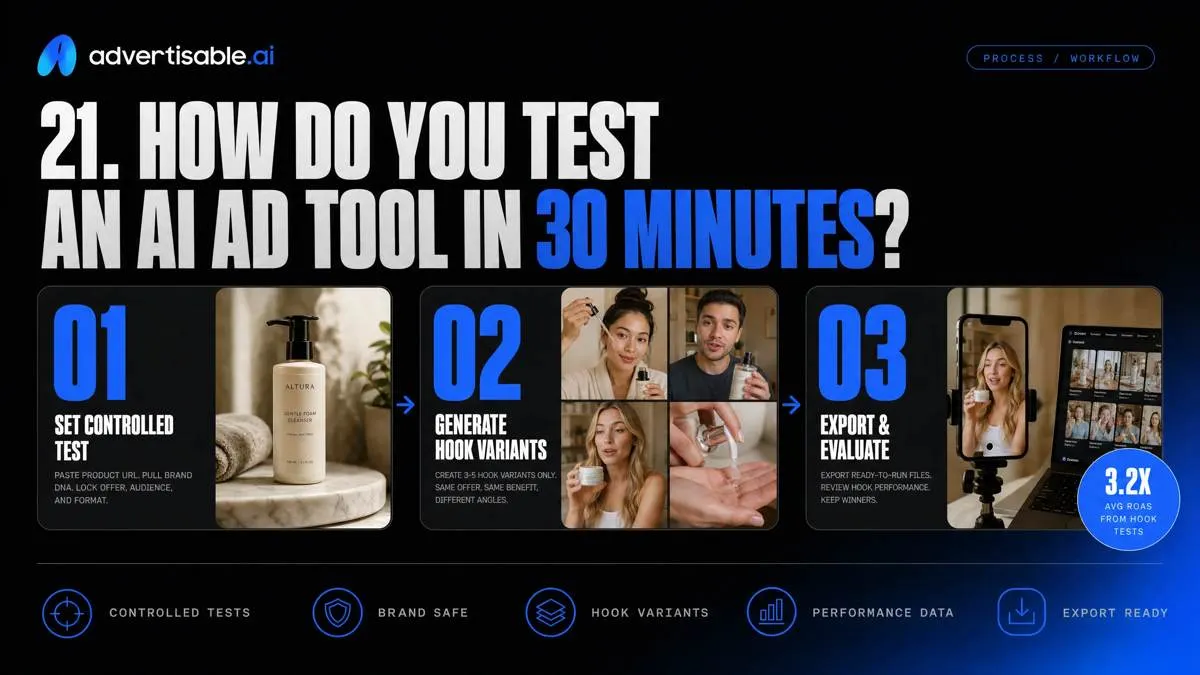
You are evaluating two risks: paying for hype you cancel inside 90 days, and shipping off-brand variants you cannot learn from. A 30-minute test is enough if you force a controlled, hook-only batch and demand export-ready files.
In Advertisable AI Studio Pro 25, paste one product URL so Brand DNA pulls product facts and visual guardrails. Generate 3-5 hook variants only (same offer, proof, CTA). Pick one metric for your 48-72 hour readout.
In the Storyboard Editor, identify the weakest scene, usually the hook. Use Scene Regenerator to replace only that beat, then export 9:16, 1:1, and 16:9 so you can launch without re-cutting.
Run your first controlled batch in 30 minutes
If you want clean learnings without brand drift, start with a workflow you can repeat weekly. We built Advertisable AI Studio Pro 25 for exactly that constraint: small teams shipping production-ready ad variants while keeping control.
Here is the test: drop in one product URL, let Brand DNA set your guardrails, then generate 3 to 5 hook-only variants with the rest of the storyboard held constant. Launch them, take a fixed 48 to 72 hour readout on one metric, then use Scene Regenerator to replace only the weak beat instead of redoing the whole ad.
When the batch is approved, export 9:16, 1:1, and 16:9 and run the same controlled test on Meta, TikTok, or YouTube.
Frequently Asked Questions
How does Brand DNA work and why is it important?
Brand DNA is the set of guardrails we extract from your product URL so your ads stay consistent on voice, visuals, and product details. It matters because you can lock those constants once, then scale variants without re-litigating brand decisions every batch.
What's the difference between AI ad software and hiring an agency?
I ad software is the right fit when your bottleneck is producing and iterating on ad creative fast enough to keep testing. An agency is the right fit when you need ongoing strategy ownership and broader execution, but you should still account for revision loops, QA, and stakeholder approvals either way.
Can I regenerate just one scene instead of remaking the entire ad?
Yes. In Advertisable AI Studio Pro 25, Scene Regenerator lets you replace a single beat, like the hook or proof, while keeping everything you held constant intact. That is how you protect attribution and keep iteration cycles short.